C++ Usage
The Steam plugin provides a native C++ API with full parity to the Blueprint layer. All functionality available in Blueprints can also be accessed from C++ using the same Steam data types and behavior.
The C++ API is modular. Each Steam feature area is exposed through its own dedicated *CPPLibrary.
C++ API Structure
Each Steam feature area is represented by a separate *CPPLibrary header. Libraries are independent and can be included and used in any combination.
This means:
- There is no central entry point for all Steam functionality
- Each library corresponds to one Steam feature area
- Only the required headers need to be included
- The C++ API mirrors the Blueprint API for the same feature
Available C++ Libraries
The plugin provides the following C++ libraries:
| Header file | Feature |
|---|---|
SteamAchievementsCPPLibrary.h |
Achievements |
SteamCloudSavesCPPLibrary.h |
Cloud Saves |
SteamDLCCPPLibrary.h |
DLC |
SteamFriendsCPPLibrary.h |
Friends |
SteamInputCPPLibrary.h |
Steam Input |
SteamLeaderboardsCPPLibrary.h |
Leaderboards |
SteamLobbiesCPPLibrary.h |
Lobbies |
SteamMultiplayerCPPLibrary.h |
Multiplayer |
SteamOverlayCPPLibrary.h |
Overlay |
SteamPresenceCPPLibrary.h |
Rich Presence |
SteamScreenshotsCPPLibrary.h |
Screenshots |
SteamStatsCPPLibrary.h |
Stats |
SteamUserCPPLibrary.h |
User |
SteamUtilityCPPLibrary.h |
Utilities |
SteamVoiceChatCPPLibrary.h |
Voice Chat |
Enable C++ Access
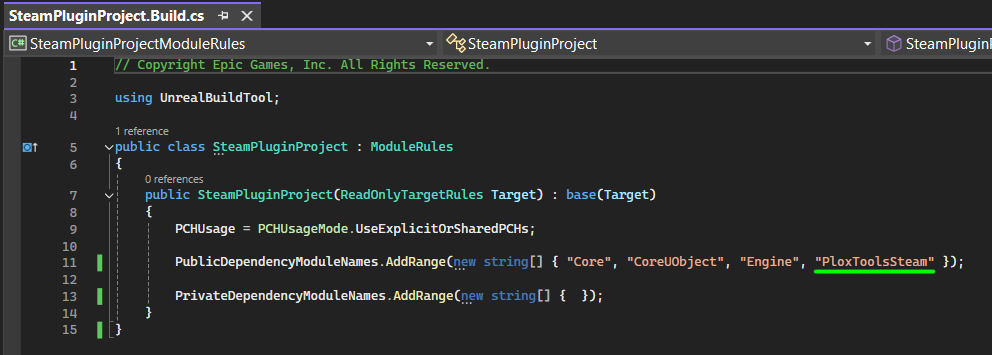
To access the Steam plugin from C++ code, add the plugin module to your project's Build.cs file.
Open your project's *.Build.cs file and add "PloxToolsSteam" to the dependency modules:
PublicDependencyModuleNames.AddRange(
    new string[]
    {
        "Core",
        "CoreUObject",
        "Engine",
        "PloxToolsSteam"
    }
);
Once the module is added, include the library header for the Steam feature you want to use:
#include "SteamAchievementsCPPLibrary.h"
You can include any *CPPLibrary.h header depending on the functionality required by your class.
General Usage Pattern
The C++ libraries follow the same three general usage patterns as the Blueprint API:
- Synchronous functions return their result immediately
- Asynchronous functions report their result through native Unreal delegates
- Persistent event subscriptions return a handle and continue receiving events until explicitly unsubscribed
Synchronous Functions
Synchronous functions execute immediately and return their result directly.
They are commonly used for:
- State checks
- Cached data access
- Local queries
- Simple utility operations
For example, checking whether an achievement is unlocked:
#include "SteamAchievementsCPPLibrary.h"

bool UMyClass::IsAchievementUnlocked(const FString& AchievementID)
{
    return USteamAchievementsCPPLibrary::IsSteamAchievementUnlocked(AchievementID);
}
Synchronous functions may also return Steam data structures directly.
For example, reading cached friend information:
#include "SteamFriendsCPPLibrary.h"

void UMyClass::CacheFriendInfo(int32 Index)
{
    FSteamFriend Friend = USteamFriendsCPPLibrary::GetSteamFriend(Index);

    if (!Friend.UserID.IsValid())
    {
        return;
    }

    CachedFriendUserID = Friend.UserID;
    CachedFriendName = Friend.PersonaName;
    CachedFriendIsOnline = Friend.bIsOnline;
}
Asynchronous Functions
Operations that need to communicate with Steam may complete later and return their result through native Unreal delegates.
The usual pattern is:
- Create the required delegate
- Bind a function or lambda to it
- Pass the delegate to the Steam function
- Handle the result when Steam completes the operation
For example, unlocking an achievement:
#include "SteamAchievementsCPPLibrary.h"

void UMyClass::UnlockAchievement(const FString& AchievementID)
{
    FOnSteamUnlockAchievementSuccessNative OnSuccess;
    OnSuccess.BindLambda([]()
    {
        UE_LOG(LogTemp, Log, TEXT("Achievement unlocked"));
    });

    FOnSteamUnlockAchievementFailureNative OnFailure;
    OnFailure.BindLambda([](const FString& Error)
    {
        UE_LOG(LogTemp, Error, TEXT("Failed to unlock achievement: %s"), *Error);
    });

    USteamAchievementsCPPLibrary::UnlockSteamAchievement(
        AchievementID,
        OnSuccess,
        OnFailure
    );
}
Asynchronous operations can also return Unreal objects or Steam data through their delegates.
For example, loading a USaveGame object from Steam Cloud:
#include "SteamCloudSavesCPPLibrary.h"
#include "MySaveGame.h"

void UMyClass::LoadGameFromCloud(const FString& FileName)
{
    FOnSteamCloudLoadGameSuccessNative OnSuccess;
    OnSuccess.BindLambda([](USaveGame* LoadedGame)
    {
        UMySaveGame* SaveGame = Cast<UMySaveGame>(LoadedGame);
        if (!SaveGame)
        {
            return;
        }

        UE_LOG(
            LogTemp,
            Log,
            TEXT("Cloud save loaded. Level: %d, Coins: %d"),
            SaveGame->PlayerLevel,
            SaveGame->Coins
        );
    });

    FOnSteamCloudLoadGameFailureNative OnFailure;
    OnFailure.BindLambda([](const FString& Error)
    {
        UE_LOG(LogTemp, Error, TEXT("Failed to load cloud save: %s"), *Error);
    });

    USteamCloudSavesCPPLibrary::LoadGameFromSteamCloud(
        FileName,
        OnSuccess,
        OnFailure
    );
}
One-time asynchronous calls manage their own callback lifetime and do not require manual unsubscription.
Persistent Event Subscriptions
Some Steam events can occur multiple times during gameplay.
These APIs use an explicit Subscribe / Unsubscribe pattern:
- Create and bind the event delegate
- Call the corresponding
Subscribe...function - Store the returned handle
- Use that handle to unsubscribe when the event is no longer needed
For example, listening for DLC installation events:
#include "SteamDLCCPPLibrary.h"

void UMyClass::StartListeningForDLC()
{
    FOnSteamDLCInstalledNative OnInstalled;
    OnInstalled.BindUObject(this, &UMyClass::HandleDLCInstalled);

    DLCListenerHandle =
        USteamDLCCPPLibrary::SubscribeToSteamDLCInstalled(OnInstalled);
}

void UMyClass::HandleDLCInstalled(int32 DLCAppID)
{
    UE_LOG(LogTemp, Log, TEXT("DLC installed: %d"), DLCAppID);
}

void UMyClass::StopListeningForDLC()
{
    if (!DLCListenerHandle.IsValid())
    {
        return;
    }

    USteamDLCCPPLibrary::UnsubscribeFromSteamDLCInstalled(DLCListenerHandle);
    DLCListenerHandle = FSteamDLCListenerHandle();
}
The listener handle should be stored as a member of the subscribing object:
FSteamDLCListenerHandle DLCListenerHandle;
Persistent subscriptions should be removed when the listener is no longer needed or before the subscribing object is destroyed.
Unlike one-time asynchronous operations, subscribed events can fire repeatedly until explicitly unsubscribed.
Summary
The Steam C++ API uses one library per Steam feature area and follows three consistent patterns:
- Call synchronous functions for immediate state and cached data
- Bind native delegates for one-time asynchronous Steam operations
- Store subscription handles for persistent Steam events and unsubscribe when finished
Once these patterns are understood, the same general workflow applies across Achievements, Cloud Saves, DLC, Friends, Steam Input, Leaderboards, Lobbies, Multiplayer, Overlay, Rich Presence, Screenshots, Stats, User, Utilities, and Voice Chat.