Rewarded Interstitial
Rewarded Interstitial ads are fullscreen advertisements that provide a reward after the user completes the ad experience.
Unlike standard Rewarded ads, this format can be shown at a natural transition without requiring the user to press a dedicated “Watch Ad” button. However, the user must be informed about the reward before the ad begins and must be given a clear option to continue without viewing it.
The general initialization and loading workflow is described in Basic Usage. This page focuses on Rewarded Interstitial-specific behavior and reward handling.
Before Showing the Ad
Before displaying a Rewarded Interstitial, show a clear introduction screen or message that explains:
- that an advertisement will be shown;
- what reward the user will receive;
- that the user can skip the advertisement and continue without the reward.
The ad should only be shown after the user accepts this prompt.
Rewarded Interstitials are best suited to natural transitions, such as:
- after completing a level;
- after losing a match or attempt;
- before moving to the next gameplay section;
- when offering an optional bonus at the end of an activity.
Do not display the ad unexpectedly or during active gameplay.
Important
Rewarded Interstitial ads require a clear reward message and a way for the user to decline the ad before it starts.
Do not use this format as a standard Interstitial with an automatic reward.
Reward Handling
Grant the reward only from On Reward Earned.
This callback confirms that the native advertising SDK reported the reward and provides:
- Amount — the numeric reward amount configured for the Ad Unit in AdMob.
- Reward Type — the reward name configured for the Ad Unit in AdMob.
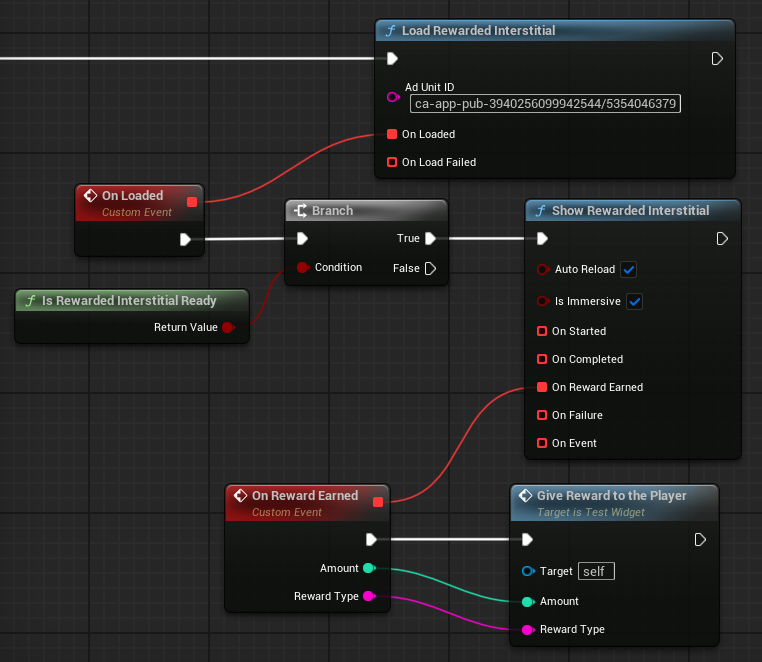
Use these values directly or map them to your own gameplay reward system.
Important
Do not grant the reward from On Started, On Completed, or a fullscreen event.
On Completed only confirms that the ad was closed or finished displaying. It does not confirm that the reward was earned.
The reward callback and completion callback are independent. On Reward Earned may be received before the ad closes.
Your reward logic should grant the reward once and should not depend on a specific callback order.
If the user declines the introduction prompt, closes the ad before earning the reward, or the show request fails, continue without granting the reward.
Loading and Reuse
A Rewarded Interstitial must be loaded before it can be shown.
Wait for On Loaded before calling Show Rewarded Interstitial. You can also use Is Rewarded Interstitial Ready when the application needs to check whether an ad is currently available.
A loaded Rewarded Interstitial can be shown only once. After it has been displayed, a new ad must be loaded before the next opportunity.
Load the ad in advance so that it is ready before the application reaches the intended transition point.
Note
A successful load does not guarantee that the ad will remain available indefinitely. Check the current state before showing if there may be a long delay between loading and display.
Display Options
Auto Reload automatically requests another Rewarded Interstitial with the same Ad Unit ID after the current ad is closed. When disabled, load the next ad manually.
Immersive Mode requests fullscreen presentation with system interface elements hidden where supported. Its exact behavior depends on the platform and device.
Auto Reload only prepares the next ad. It does not display another ad automatically or grant another reward.
Callbacks and Events
The Rewarded Interstitial show function provides several callbacks:
- On Started — the ad began displaying.
- On Completed — the ad was closed or finished displaying.
- On Reward Earned — the native SDK reported that the reward was earned.
- On Failure — the ad could not be shown.
- On Event — reports click and impression events through
EFullScreenAdEventType.
Use On Started and On Completed when the application needs to pause and restore gameplay, audio, input, or other systems around the fullscreen ad.
If On Failure is triggered, do not grant the reward. Restore the application state and allow the user to continue without the rewarded bonus.
Application State
A Rewarded Interstitial temporarily takes control of the screen.
Before showing it, consider pausing:
- active gameplay;
- timers that should not progress while the ad is visible;
- player input;
- game audio, when appropriate.
Restore the required state from both On Completed and On Failure.
Keep reward delivery separate from application state restoration. The application may need to resume even when no reward was earned.
Recommended Usage
For a reliable Rewarded Interstitial implementation:
- Load the ad before the intended transition point.
- Wait for On Loaded or verify Is Rewarded Interstitial Ready.
- Show a clear introduction that explains the reward.
- Allow the user to continue without watching the ad.
- Display the ad only after the user accepts.
- Grant the reward once, and only from On Reward Earned.
- Restore the application state from both On Completed and On Failure.
- Load the next ad manually or enable Auto Reload.
Use a standard Rewarded ad instead when the experience is built around an explicit “Watch Ad for Reward” action.
Related Reference
For exact function signatures and callback parameters, see AdMob API.
For fullscreen events and error values, see Enumerations.
For official Android and iOS demo Ad Unit IDs, see Testing.