Pending Purchases
A purchase may remain pending when Google Play has not completed the payment yet.
This can happen when the payment requires additional time or action, such as bank approval, cash payment, account balance top-up, or family approval.
Do not grant the purchased content while the purchase remains pending.
How Pending Purchases Work
When a purchase enters the pending state, the purchase flow calls On Pending.
At this point:
- The payment is not complete.
- The purchase has not been acknowledged.
- The purchased content must not be granted.
If Google Play completes the payment while the application is still running, the original purchase flow may later call On Success.
If the payment completes while the application is closed, process the purchase after the next application launch with Process Google Play Pending Purchases.
Important
Process Google Play Pending Purchases does not process purchases that are still waiting for payment.
It processes purchases that were previously pending and have since changed to the purchased state.
When to Process Pending Purchases
Call Process Google Play Pending Purchases after the billing client has been initialized.
For one-time products, configure all non-consumable Product IDs with Set Google Play Non Consumable Products before processing pending purchases.
This allows the plugin to determine whether a recovered one-time purchase should remain owned or be consumed automatically.
Process Pending Purchases
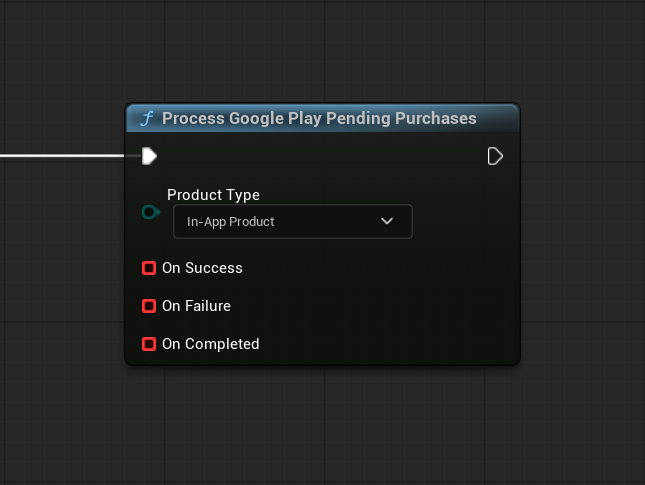
Call Process Google Play Pending Purchases and select the required product type:
- In-App Product for one-time products.
- Subscription for subscriptions.
The function processes one product type per call. To process both types, call it once for In-App Product and once for Subscription.
It queries the purchases currently associated with the user’s Google Play account and processes only purchases that:
- Have changed to the purchased state.
- Have not been acknowledged yet.
The plugin acknowledges each recovered purchase before calling On Success.
Purchase Results
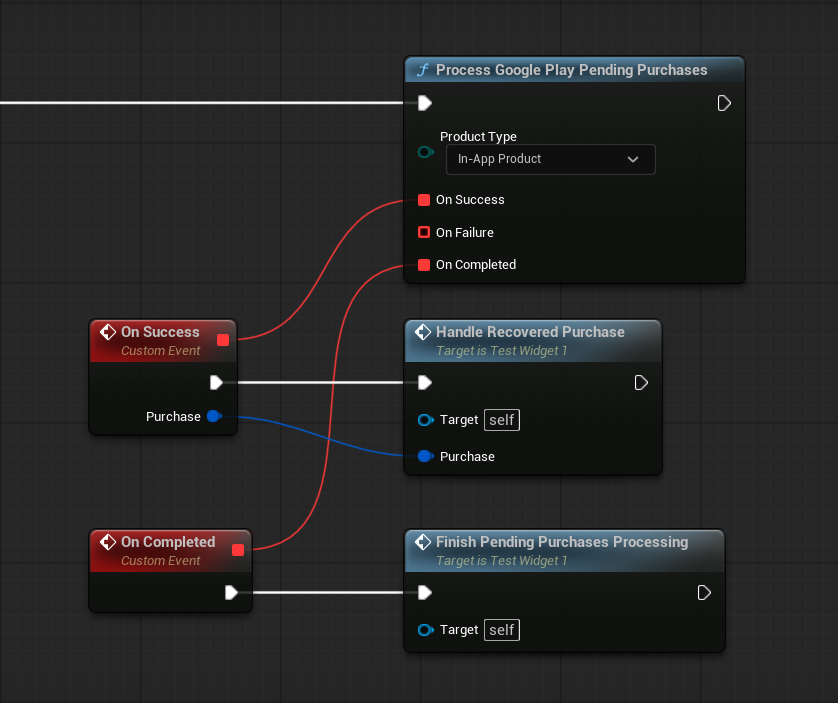
The function provides three callbacks:
- On Success
- On Failure
- On Completed
On Success
On Success is called separately for every purchase that was successfully acknowledged.
The callback returns the recovered Google Play Billing Purchase.
Use its Product ID to determine which content should be granted.
Important
Grant the purchased content only from On Success.
Do not grant content from the original On Pending callback.
On Failure
On Failure is called when the purchase query fails or when a recovered purchase cannot be acknowledged.
The callback returns:
- Product ID
- Purchase Token
- Response Code
- Error Message
For a general query error, Product ID and Purchase Token are empty because the failure is not associated with a specific purchase.
If several purchases are being processed, On Failure may be called more than once.
On Completed
On Completed is called once after the complete processing operation has finished.
It is called after all recovered purchases have produced an On Success or On Failure callback.
It is also called when no completed pending purchases are found.
Note
On Completed does not mean that every purchase was processed successfully.
It only means that the complete batch has finished processing.
When several purchases are processed, handle every On Success callback independently and use the returned Product ID to grant the corresponding content.
Consumable and Non-Consumable Processing
Recovered one-time products use the same automatic processing rules as the standard purchase flow.
For a consumable one-time product:
- The purchase is acknowledged.
- On Success is called.
- Automatic consumption is started.
- The product can be purchased again after consumption succeeds.
For a non-consumable one-time product:
- The purchase is acknowledged.
- On Success is called.
- The purchase is not consumed.
- The product remains owned by the user.
For a subscription:
- The purchase is acknowledged.
- On Success is called.
- The purchase is never consumed.
- The subscription remains owned while it is active.
Warning
Configure the non-consumable Product ID list before processing pending one-time products.
Otherwise, a permanent one-time product may be treated as consumable.
Recommended Startup Flow
The following flow covers both one-time products and subscriptions:
- Initialize the billing client.
- Wait for successful initialization.
- Configure non-consumable Product IDs.
- Call Process Google Play Pending Purchases for In-App Product.
- Grant every recovered purchase returned through On Success.
- Wait for On Completed.
- Call Process Google Play Pending Purchases for Subscription.
- Grant every recovered subscription returned through On Success.
- Wait for On Completed.
Call the function once for each product type during startup. Avoid starting multiple processing requests for the same product type at the same time.
Next Step
For information about checking previously owned products and active subscriptions, see Ownership.