Pitch Based Effects
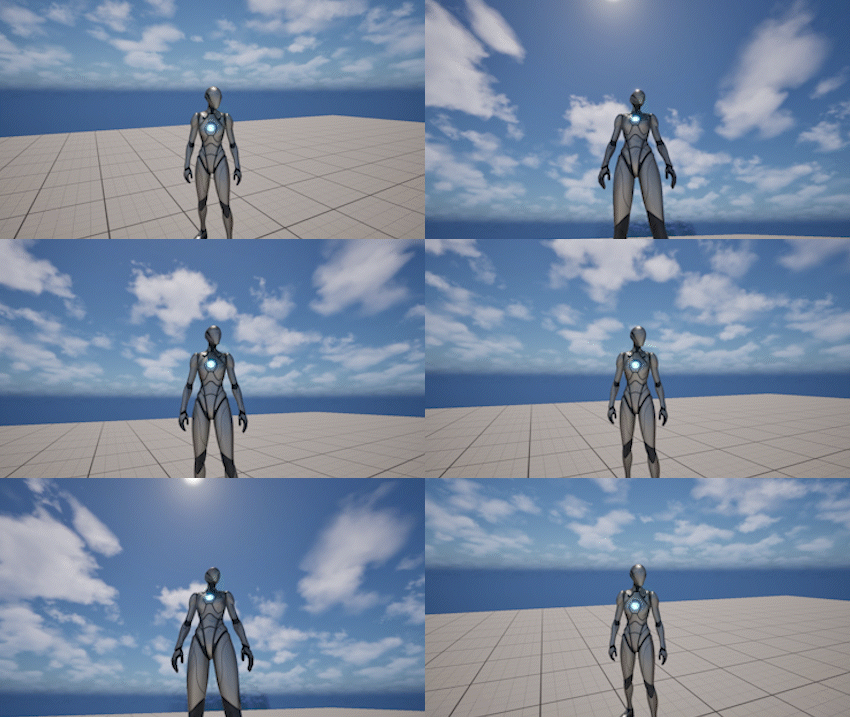
The Pitch Based Effects system dynamically adjusts camera distance and field of view based on camera pitch.
This allows the camera to feel more responsive and context-aware when looking up or down.
It helps:
- improve framing depending on vertical view direction
- enhance sense of depth and scale
- make vertical movement more readable
Behavior
Pitch Effects are applied automatically based on the current camera pitch.
- looking up and down produces different camera responses
- both distance and FOV can be affected simultaneously
- the effect is evaluated continuously at runtime
- the camera smoothly blends between states
Pitch Effects are applied on top of the current framing and do not modify base settings.
Settings
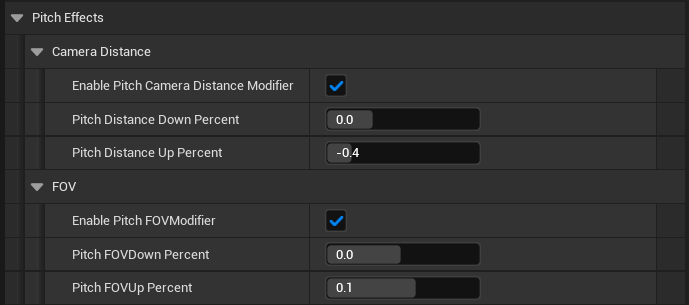
The pitch effects system is defined by the following parameters:
Camera Distance
- Enable Pitch Camera Distance Modifier - enables pitch-based modification of the base camera distance
- Pitch Distance Down Percent - percentage change applied to the base camera distance when looking down
- Pitch Distance Up Percent - percentage change applied to the base camera distance when looking up
FOV
- Enable Pitch FOV Modifier - enables pitch-based modification of camera field of view
- Pitch FOV Down Percent - percentage change applied to the camera FOV when looking down
- Pitch FOV Up Percent - percentage change applied to the camera FOV when looking up
Notes
- Pitch Effects are runtime-only and do not modify base camera settings
- Distance and FOV effects are evaluated together as a single system
- The effect depends entirely on camera pitch
- Works best when combined with Framing and Movement Anticipation