Launch In-App Review
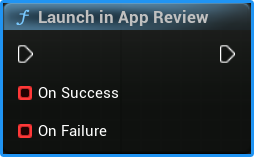
The Launch In-App Review function requests the native review prompt for the current platform:
- Android — Google Play In-App Review
- iOS — Apple StoreKit
The plugin automatically selects the correct platform implementation. The appearance, timing, and availability of the review prompt are controlled entirely by Google Play or the App Store.
Callbacks
On Success
Called when the request was successfully passed to the native platform API.
This does not confirm that:
- The review prompt was displayed
- The user submitted a rating or review
- The user dismissed or interacted with the prompt
Continue the normal game flow after this callback.
On Failure
Called when the plugin cannot start the review request because of a technical or platform-related error.
The callback provides:
- Response Code —
EInAppReviewResponseCodedescribing the error. - Message — additional diagnostic information.
The error should normally be logged for debugging. Review functionality should never be required for the player to continue using the game.
Blueprint Example
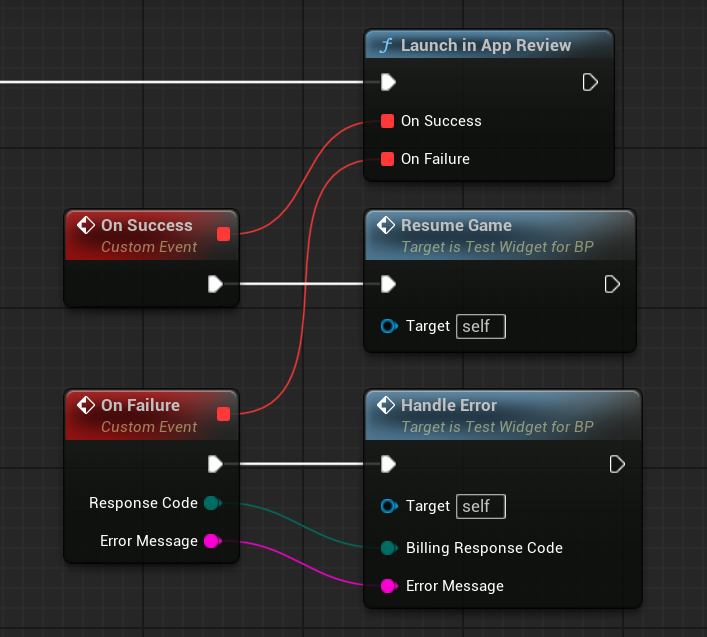
Call Launch In-App Review after a meaningful moment, such as completing a level, reaching a progression milestone, or finishing a successful session.
Both callbacks continue into the normal game flow. The review request should not pause gameplay, block progression, or wait for confirmation from the player.
Important Behavior
Calling the function does not guarantee that the review prompt will appear.
Google Play and the App Store apply their own eligibility rules and frequency limits. Your game cannot detect whether the prompt was shown or whether the player submitted a review.
Because of this:
- Do not show a message thanking the player for leaving a review.
- Do not provide rewards for submitting a review.
- Do not repeatedly call the function when no prompt appears.
- Do not make game progression depend on either callback.
For recommendations on choosing an appropriate moment, see the official Google Play guidelines and Apple guidelines.