Ownership
Ownership functions allow the application to restore permanent purchases and check active subscriptions in future sessions.
A non-consumable one-time product remains owned after purchase.
A subscription remains owned while it is active.
A consumable product is removed from ownership after it has been consumed.
How Ownership Works
Use the purchase callbacks to process a new purchase when it is completed.
Use the ownership functions later to restore access after the application restarts or when the current ownership state must be checked again.
The ownership functions return only purchases that:
- Are in the purchased state.
- Have already been acknowledged.
For purchases that were previously pending and completed while the application was closed, process them first with Pending Purchases.
Query Owned Purchases
Use Query Google Play Owned Purchases to retrieve all acknowledged purchases currently returned as owned for the selected product type.
Select:
- In-App Product for owned non-consumable one-time products.
- Subscription for currently owned subscriptions.
The function processes one product type per call. To query both types, call it once for In-App Product and once for Subscription.
On success, the function returns an array of Google Play Billing Purchase structures.
The returned array may be empty when the user does not own any products of the selected type. This is a successful result, not an error.
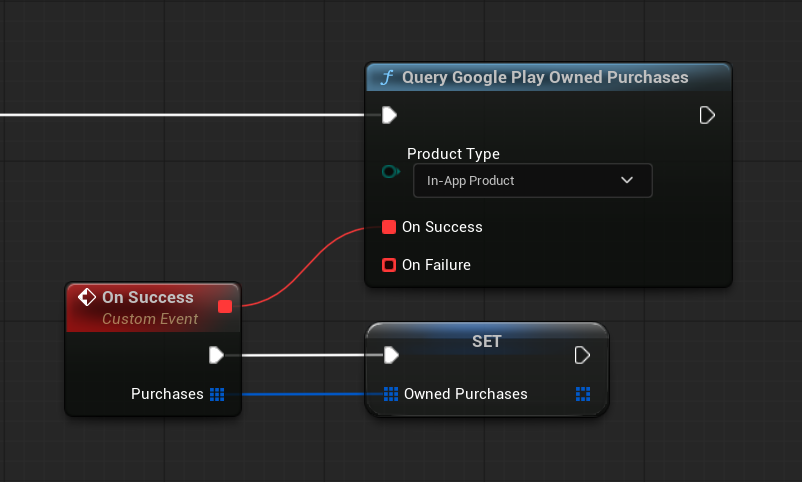
Use the Product ID from each returned purchase to restore the corresponding permanent content or subscription access.
Check a Non-Consumable Product
Use Is Google Play Product Purchased when only one non-consumable one-time product needs to be checked.
Provide the Product ID of the product, such as remove_ads.
The result is true when the product:
- Is owned by the current Google Play account.
- Is in the purchased state.
- Has already been acknowledged.
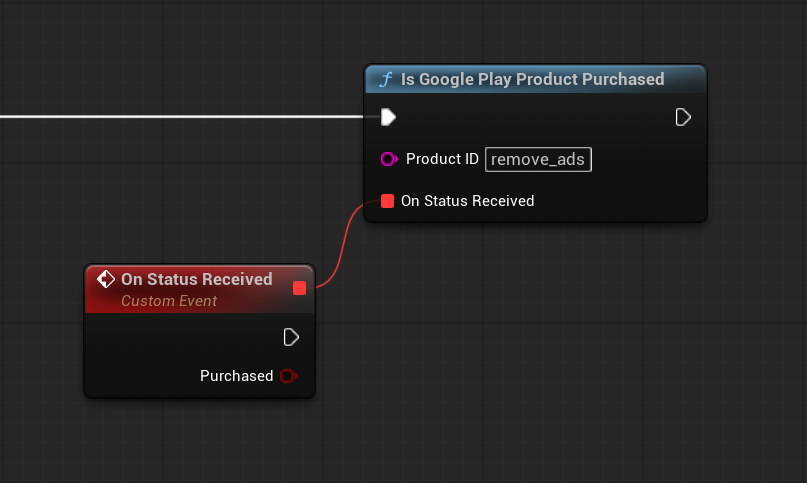
This function is useful for restoring permanent unlocks such as removing advertisements, unlocking the full version, or enabling permanent features.
Note
A false result may also be returned if the billing client is not ready or Google Play cannot complete the ownership query.
Check an Active Subscription
Use Is Google Play Subscription Active to check whether the current Google Play account owns a subscription with the specified Product ID.
The result is true when the subscription:
- Is returned as owned by Google Play.
- Is in the purchased state.
- Has already been acknowledged.
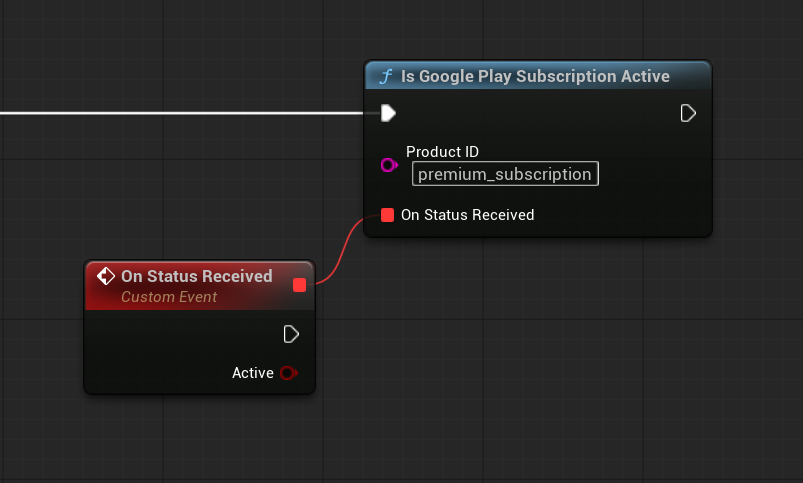
Use the result to enable or remove subscription-based access in the application.
Note
A false result may also be returned if the billing client is not ready or Google Play cannot complete the ownership query.
This function checks the current ownership information returned by Google Play Billing. It does not provide server-side purchase validation or detailed subscription expiration information.
When to Check Ownership
Check ownership after the billing client has been initialized.
A typical startup order is:
- Initialize the billing client.
- Configure non-consumable Product IDs.
- Process completed pending purchases.
- Query owned one-time products.
- Query owned subscriptions.
- Apply permanent unlocks and subscription access.
Ownership can also be checked again after the user returns to the application if the purchase or subscription state may have changed outside the current session.
Ownership and Consumable Products
Consumable one-time products are not intended to remain owned.
After a consumable purchase is acknowledged, the automatic purchase flow consumes it. Once consumption succeeds, Google Play allows the product to be purchased again and it is no longer returned as owned.
Do not use the ownership functions to restore consumable content such as:
- Virtual currency
- Energy
- Boosts
- Repeatable item packs
Save the granted consumable content in the application’s own persistent data or backend system.
Important
Ownership functions should be used for non-consumable products and subscriptions.
They should not be used as permanent storage for consumable content.
Next Step
For information about controlling acknowledgement and consumption manually, see Manual Purchase Flow.