C++ Usage
To use the plugin directly from C++ code, add its module to your project's *.Build.cs file.
Add the Module Dependency
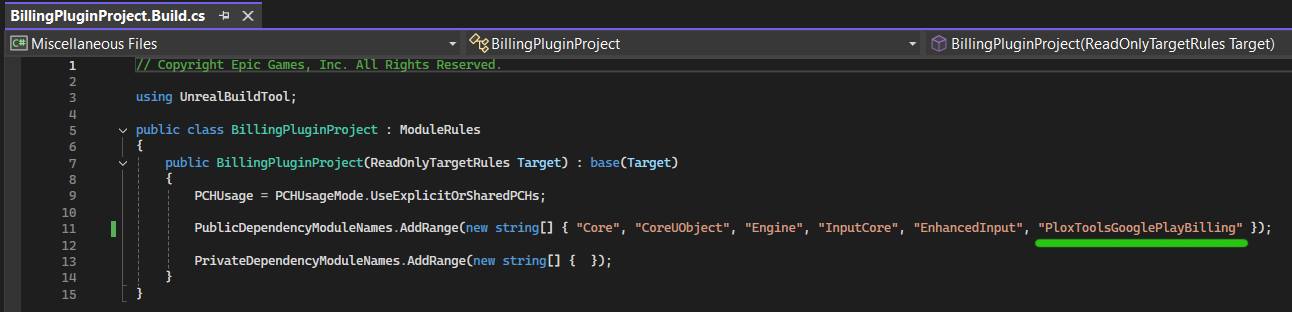
Open your project's *.Build.cs file and add "PloxToolsGooglePlayBilling" to the public dependency modules list:
PublicDependencyModuleNames.AddRange(new string[]
{
    "Core",
    "CoreUObject",
    "Engine",
    "InputCore",
    "EnhancedInput",
    "PloxToolsGooglePlayBilling"
});
After adding the module, include the plugin header in the C++ class where you want to use Google Play Billing:
#include "GooglePlayBillingCPPLibrary.h"
The plugin's C++ API is now available in your project. You can open GooglePlayBillingCPPLibrary.h from your IDE to view all exposed functions and native delegate types.
General Usage Pattern
All plugin functions are exposed as static methods of UGooglePlayBillingCPPLibrary.
Depending on the operation, a function can be either synchronous or asynchronous.
Synchronous functions return their result immediately or perform an operation without waiting for a native callback. They can be called directly and do not require delegates.
Asynchronous functions return their results through native Unreal delegates. Each asynchronous function accepts the delegate types required by that operation.
The general usage pattern is:
- Include
GooglePlayBillingCPPLibrary.h. - Call the required static function from
UGooglePlayBillingCPPLibrary. - For asynchronous functions, create and bind the required native delegates.
- Pass the bound delegates into the function parameters.
- Handle the returned result inside the delegate callbacks.
You can view the exact function signatures and required delegate types in GooglePlayBillingCPPLibrary.h.
Examples
Synchronous Function
Synchronous functions can be called directly and return their result immediately.
The following example checks whether the billing client is ready:
#include "GooglePlayBillingCPPLibrary.h"

bool UMyClass::IsBillingReady()
{
    return UGooglePlayBillingCPPLibrary::IsGooglePlayBillingReady();
}
Other synchronous functions can configure non-consumable products or check whether a product is marked as non-consumable.
Asynchronous Function
Asynchronous functions require the native delegates declared for that specific operation.
The following example queries a single product:
#include "GooglePlayBillingCPPLibrary.h"

void UMyClass::QueryRemoveAdsProduct()
{
    FOnSingleGooglePlayProductDetailsQuerySuccessfulNative OnSuccess;
    OnSuccess.BindLambda(
        [](const FGooglePlayBillingProductDetails& ProductDetails)
        {
            UE_LOG(
                LogTemp,
                Log,
                TEXT("Product loaded: %s, Price: %s"),
                *ProductDetails.ProductId,
                *ProductDetails.FormattedPrice
            );
        }
    );

    FOnSingleGooglePlayProductDetailsQueryFailedNative OnFailure;
    OnFailure.BindLambda(
        [](EGooglePlayBillingResponseCode ResponseCode, const FString& ErrorMessage)
        {
            UE_LOG(
                LogTemp,
                Error,
                TEXT("Product query failed: %s (Code: %d)"),
                *ErrorMessage,
                static_cast<int32>(ResponseCode)
            );
        }
    );

    UGooglePlayBillingCPPLibrary::QuerySingleGooglePlayProductDetails(
        TEXT("remove_ads"),
        EGooglePlayBillingProductType::InAppProduct,
        OnSuccess,
        OnFailure
    );
}
QuerySingleGooglePlayProductDetails requires FOnSingleGooglePlayProductDetailsQuerySuccessfulNative and FOnSingleGooglePlayProductDetailsQueryFailedNative.
Other asynchronous functions use their own delegate types for initialization, purchase results, pending purchases, ownership queries, acknowledgement, consumption, and in-app messages.
Summary
The plugin exposes its complete C++ interface through UGooglePlayBillingCPPLibrary.
Synchronous functions are called directly, while asynchronous functions return their results through operation-specific native delegates. The required delegate types and parameter order are defined in GooglePlayBillingCPPLibrary.h.