Location Lag
The Location Lag system smooths the gameplay camera pivot before the camera position and collision are calculated.
This is useful for reducing small vertical camera bumps caused by:
- stairs
- uneven terrain
- small ledges
- sudden height changes
Location Lag can be controlled separately for horizontal movement and vertical movement.
This makes it possible to smooth vertical motion without adding unwanted horizontal delay.
Behavior
Location Lag is applied to the camera pivot before framing, collision, and final camera placement.
The system supports independent smoothing for:
- XY movement - horizontal camera pivot movement
- Z movement - vertical camera pivot movement
In most third-person games, vertical smoothing is more useful than horizontal smoothing.
For this reason, the default setup enables Z Location Lag and keeps XY Location Lag disabled.
This helps smooth terrain and step movement while keeping the camera responsive during normal horizontal movement.
Vertical Lag
Vertical Location Lag smooths camera movement when the character moves up or down.
This helps prevent the camera from reacting too sharply to small height changes.
It is especially useful for:
- walking over uneven ground
- moving up stairs
- stepping over small obstacles
- small changes in capsule or pivot height
The camera still follows the character, but the vertical movement is softened over time.
Jumping and Falling
Location Lag can use a separate vertical speed while the character is jumping or falling.
This keeps the camera smooth on the ground, but more responsive in the air.
Without a separate falling speed, vertical lag may feel delayed during jumps.
With separate falling speed enabled:
- ground movement can remain soft
- jumping and falling can feel more responsive
- the camera avoids snapping instantly to the raw pivot
- walking off ledges produces a smoother transition
Horizontal Lag
Horizontal Location Lag smooths camera pivot movement on the XY plane.
This can create a softer, more cinematic camera feel, but it may also make the camera feel less responsive in fast action games.
For most gameplay cameras, horizontal lag should be used carefully.
It can be useful for:
- slower adventure cameras
- cinematic third-person movement
- heavier character movement
- non-combat exploration cameras
For responsive action, shooter, or souls-like cameras, it is usually better to keep horizontal lag disabled or use a high speed value.
Settings
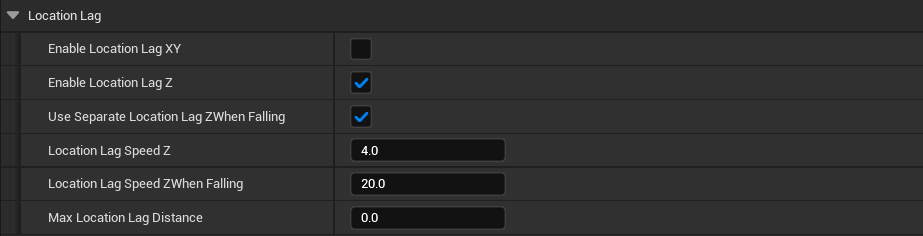
The Location Lag system is defined by the following parameters:
- Enable Location Lag XY - enables horizontal smoothing of the gameplay camera pivot
-
Enable Location Lag Z - enables vertical smoothing of the gameplay camera pivot
-
Use Separate Location Lag Z When Falling - uses a different vertical lag speed while the character is jumping or falling
-
Location Lag Speed Z When Falling - controls how quickly vertical lag follows the character while jumping or falling
-
Location Lag Speed XY - controls how quickly the camera pivot follows horizontal movement
-
Location Lag Speed Z - controls how quickly the camera pivot follows vertical movement
-
Max Location Lag Distance - limits the maximum allowed distance between the raw pivot and the lagged pivot. Set to
0to disable distance limiting
Recommended Setup
For most third-person games, a good default setup is:
- Enable Location Lag XY - disabled
- Enable Location Lag Z - enabled
- Use Separate Location Lag Z When Falling - enabled
- Location Lag Speed Z - low or moderate
- Location Lag Speed Z When Falling - higher than normal Z speed
This keeps the camera stable over terrain, but avoids delayed camera movement during jumps and falls.
Notes
- Location Lag is applied before camera collision
- It affects the camera pivot, not the final camera transform directly
- Vertical lag is usually safer than horizontal lag
- Horizontal lag can make the camera feel less responsive if the speed is too low
- Falling speed should usually be higher than regular vertical lag speed
Max Location Lag Distancecan be used as a safety limit for large sudden movement changes